2027 Festival Map — Current Delivery Review
Current Delivery Review
This review covers the Sundance Film Festival 2027 map and festival data currently implemented as of August 17, 2026.
The purpose of this review is to validate the current delivered baseline so that subsequent project work can continue from an established and accepted point.
This is not a final review of the January 2027 production map. Festival information, integrations, functionality, and other project elements scheduled for subsequent phases may continue to change or be added after this review.
Map Version Under Review
Baseline Date: August 17, 2026
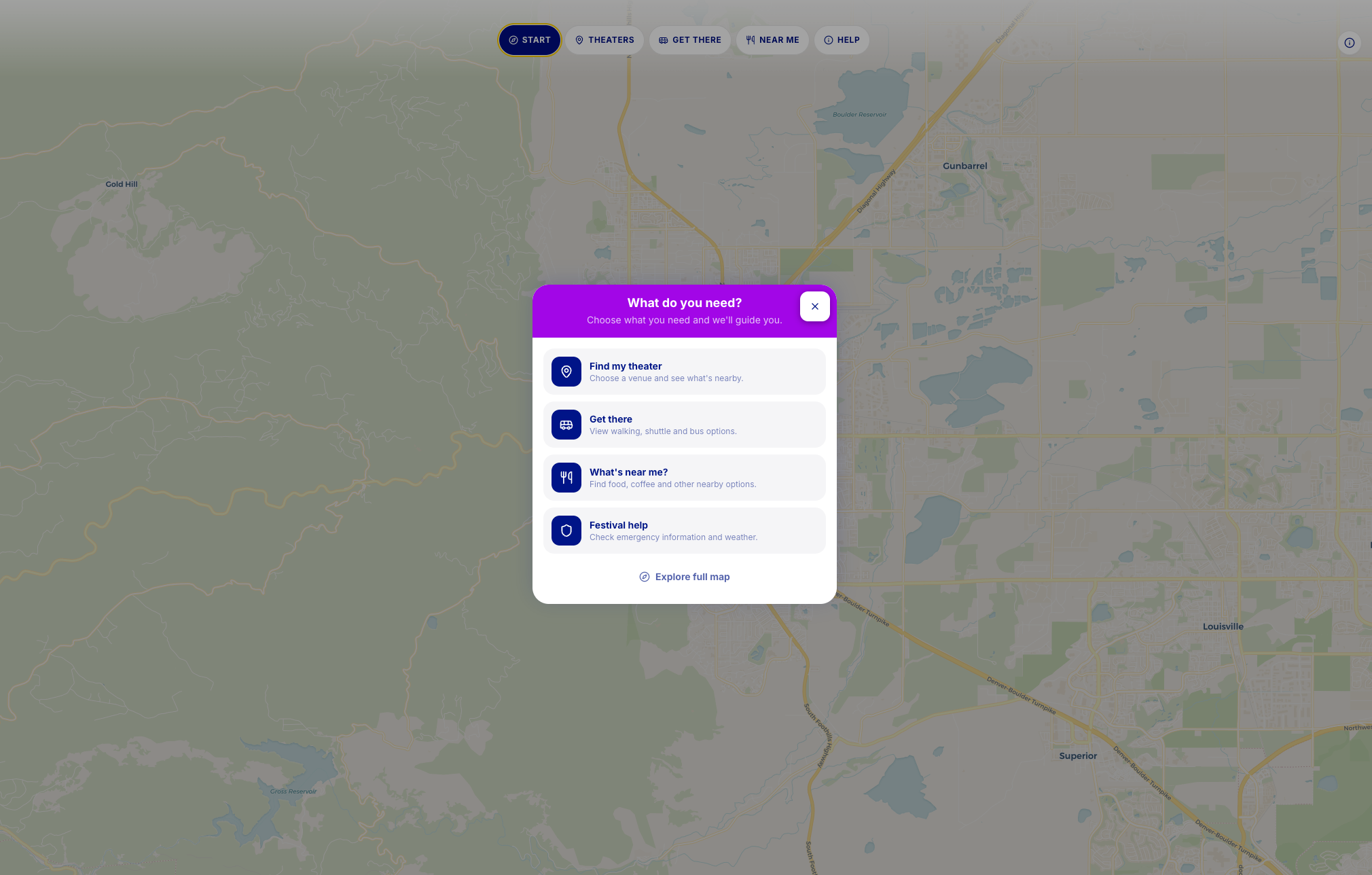 Click to open full map
Approval Scope
Current Festival Data
Review whether festival information currently supplied to MCB is accurately represented in the map.
Locations & Classification
Review the current placement, identification, and classification of venues, Festival Headquarters, hotels, transportation locations, and other represented points of interest.
Information Architecture
Review the current organization of festival information, including categories, profiles, map cards, navigation, and information hierarchy.
Map Experience
Review the current functional experience for locating, understanding, and navigating festival information.
Transit Implementation
Review the transportation and transit information currently incorporated into the map and its representation within the festival experience.
Data Synchronization
Review applicable current data-management and synchronization functionality that has been implemented and demonstrated as part of this delivery.
Current Functional Baseline
Confirm that the delivered map, taken as a whole, provides an acceptable functional baseline from which subsequent 2027 Festival Map development may continue.
What This Approval Does Not Finalize
Approval of this milestone does not constitute final approval of:
- •The January 2027 production map
- •Sponsor data and map representation
- •Festival information that has not yet been provided to MCB
- •Future venue, hotel, schedule, transit, sponsor, or operational changes
- •Functionality assigned to subsequent project phases
- •Final production-readiness testing
- •Future content additions or data updates
Changes to festival information after this review remain part of the continuing project workflow and do not reopen approval of this delivered baseline.
Review Notes
Please use review notes for corrections or issues affecting the current delivered baseline. Future additions or requests for subsequent phases may also be documented but should be identified as future work.
Submitted Notes (10)
From our QA Tester. Note that they are still testing 1. On Desktop, When selecting a location from “Near Me,” the location label become non visible (displayed under the locations) untill the map is zoomed in- https://drive.google.com/file/d/1gIJkr2RtTTRwNDbXO1iAXsqd51iVFjkH/view?usp=sharing
1. On desktop the "Get there" button does not function. This works correctly on Mobile allowed my location upon opening the map. I did not receive a allow location prompt on desktop (chrome/mac/incognito and regular mode). 2. Is the only option for directions - Walking? there is no driving option? 3. On desktop and mobile (iphone 17, 26.6) on the direction screen you cannot move the direction details up to see more of the directions. It's also not obvious that you can scroll on mobile. You cannot move it down or up. https://drive.google.com/file/d/1KvluQWB1DoTRFpKHUR-dfWdxPEZsMbQL/view?usp=sharing , https://drive.google.com/file/d/13nEmufRJEL7C5NC5z1surLAbJVSJ6PFs/view?usp=sharing 4. Same on this screen you cannot move this portion up. https://drive.google.com/file/d/1cX_M5fCe7N3aOc5o6c3XdRBCA0hUOOaU/view?usp=sharing 5. It looks like this screen at the bottom is scrollable, but there is no way to tell that it is https://drive.google.com/file/d/1expyme3aX76NxVuBxC-TnbgBZjMwtENa/view?usp=sharing. I only knew because I saw it on desktop. 6. On mobile, there is no option for the venue details on this screen to be viewed full screen or expand to the top https://drive.google.com/file/d/1_zdh2XMsKzGkDiXzFYj5wWQU3c06X9Ql/view?usp=sharing 7. If I go to a venue or restaurant and view the details and click/tap anything nearby it takes me to the walking directions screen with no option to go back to where I was and or to view the details. It just has directions. https://drive.google.com/file/d/1jcdi-McSb51_J3aTV6fDCTJUczN7FkAU/view?usp=sharing
Images don't match for the venues when comparing to our existing google map https://festival.sundance.org/media/maps I've gone ahead and made folder that I used for the google map to avoid any confusion from the images you may have been looking at previously
View attachment1. “What do you need?” Nav: Add a comma after “shuttle” and “coffee” 2. Theater names: “Roe Green Theater” should be “Roe Green Theatre” throughout
The map can look clustered when all of the icons show simultaneously. Adding a filter for personalized views would increase accessibility by reducing visual clutter.
View attachmentThe icon buttons on the map look great but it would help to have the names populate when a mouse hovers over the icon so that they do not need to click into each to discover the venue then remember it as they go back to the main map.
View attachmentFeedback from Kristen... For the below: Pop up box - "Get There" - Shuttle & Bus are redundant. We don't have shuttles, so use bus View Walking Shuttle and Bus options (should add parking here + this is where micro-modal should also go when you are ready*) * in the near future Chad will have the scooter/ebike corral locations Under Theaters, I would adjust Roe Green and Muenzinger to match the other CU spaces with: CU Boulder - Not the world's biggest deal, but where it says use your location to find nearby festival and public transportation, what do we mean when we say festival transportation? - I suspect there will be updates to the names (ex Julien garage is actually the St Julien Garage) - At a future point the walk paths between venues should be vetted to ensure that people are crossing the path of Adobe at BMoca (once the deal is done), etc. - Something is up with the bus routes. The map should include the jump which goes down Arapahoe past BHS. Chad can consult. - I assume the outlying area routes (including Denver and the airport and the Airport to downtown denver light rail will be added)
View attachmentHi team, some minor notes from our QA Testing observations: 1. Festival help X button position - Slightly misaligned 2. When selecting a location from “Near Me,” the location label displayed above the selected pin is scrolled up, resulting in a visibility issue. 3. The “No upcoming screening on your ticket” section is displayed for non-theater locations, such as cafés and restaurants. 4. The “Current Conditions” weather pop-up’s top section is inaccessible when “Near Me” mode is selected, preventing the user from closing the pop-up. 5. On handsets in landscape mode, the “Current Conditions” weather pop-up is not scrollable. 6. The location detail - Non-functional “Get there” button - Non-functional “X min walk” in the “Mobility” section - No map navigation after selecting any option from the ”Nearest Theaters” column - Non-functional “Nearby Bites” options - Small scrolling area on handsets - On iOS handsets, tapping a Hop link prompts the user to open it in Maps. After canceling the prompt, the user is redirected to a blank page. 7. The Bus Routes labels displayed on the map are too small, causing the corresponding route text to extend outside the label. 8. When the user has a stop selected and tries to select the location “Near Me” → “Walk Here”, the map scrolls to the selected stop location, but no route is displayed to show how to get from the stop to the selected café/restaurant.
View attachmentCurious why we are listing Theaters, not Festival Venues in the top navigation. In between Start & Get There.
The Dairy I like they way this is being managed but we do need make it clearer that all the venues at The Dairy are all individual theaters (Grace Gamm, Bodecker, Gordan Gamm). Maybe bold the text or something like this, we want it to be clear that these are all individual theatre venues. We could also list the tree venues under the pin drop as well.
View attachmentFinal Delivery Approval
Status: Approved
Approved by: Seth Arora
Approved: 8/28/2026, 4:48:44 PM
Baseline approved: August 17, 2026
Review Timeline
The current delivery is available for Sundance review from August 17, 2026 through August 27, 2026.
Please identify corrections to the currently represented festival data or delivered functionality during this review period.
Following the close of the review period, the Current Map Delivery milestone will close for billing purposes, and subsequent additions or changes to festival information will continue through the ongoing project workflow.
Administrative Summary
| Baseline date | August 17, 2026 |
| Review start date | August 17, 2026 |
| Review end date | August 27, 2026 |
| Current approval status | Approved |
| Number of review notes | 10 |
| Number resolved | 7 |
| Number designated Future Update | 1 |
| Number designated Out of Current Review Scope | 0 |
| Final approver | Seth Arora |
| Approval timestamp | 8/28/2026, 4:48:44 PM |
Delivery → Review Opportunity → Feedback Record → Acceptance → Milestone Closure